Shared hosting vs VPS vs cloud hosting is not just a pricing question. It is an infrastructure decision that affects speed, reliability, security, operational workload, and how easily a business can grow online. The short version: shared hosting is best for simple websites with low technical overhead, VPS hosting gives more control and predictable resources, and cloud hosting is the right direction when traffic, uptime, automation, or scaling requirements become business-critical.

Key Takeaways
- Choose shared hosting when the site is simple, traffic is modest, and the team wants the lowest operational workload.
- Choose VPS hosting when you need root access, custom server configuration, better isolation, or more predictable performance.
- Choose cloud hosting when the workload needs high availability, elastic scaling, managed databases, object storage, or multi-region architecture.
- The cheapest plan is rarely the cheapest system once support time, downtime, backups, migrations, and security operations are included.
- A good migration path is progressive: start simple, measure bottlenecks, move to VPS when control becomes necessary, then cloud when resilience and scale justify the complexity.
What does shared hosting vs VPS vs cloud hosting really mean?
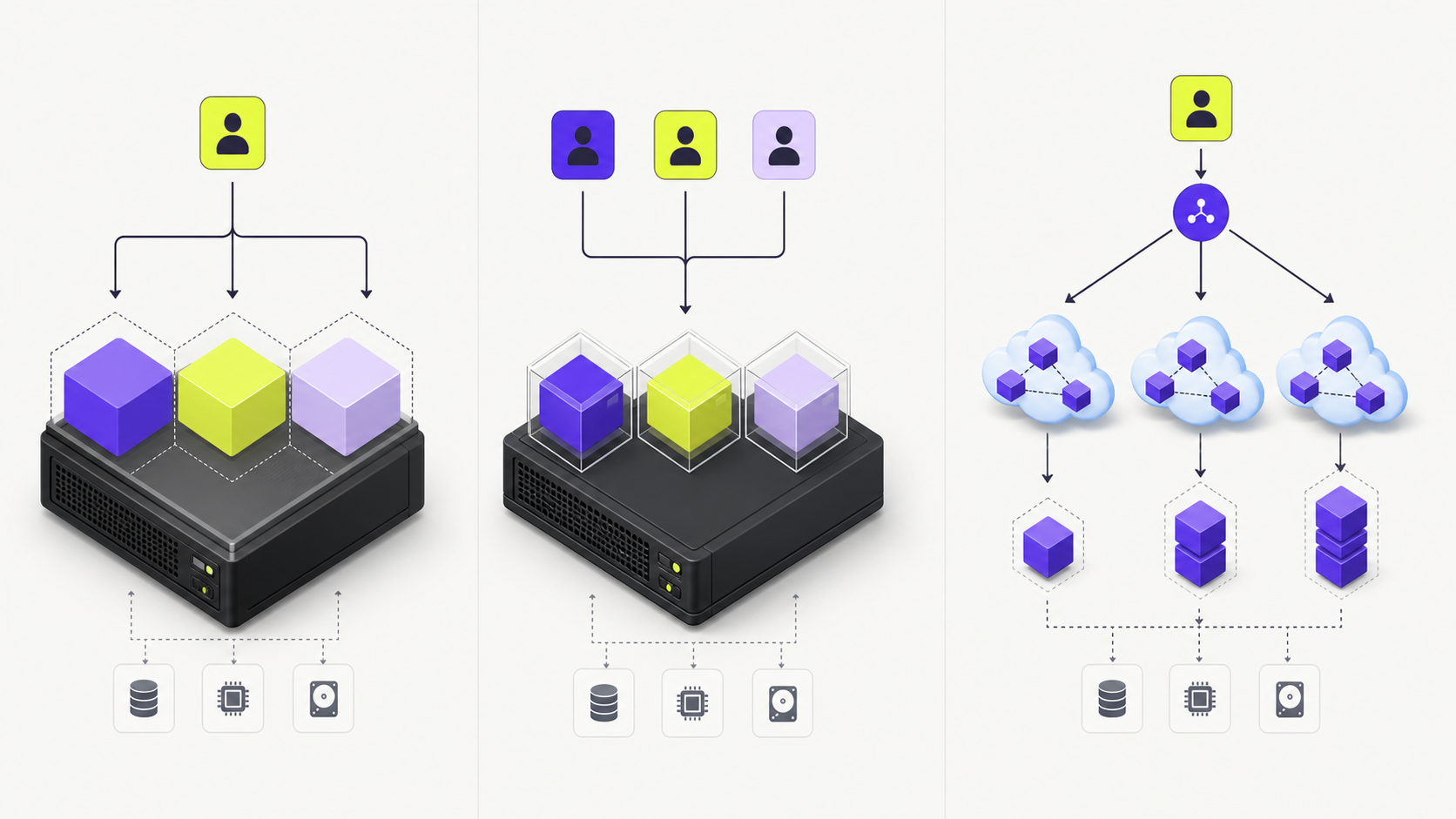
In shared hosting, many websites run on the same server environment. The provider manages most of the stack: web server, control panel, PHP or Node configuration, email features, backups, and basic security controls. Hostinger’s own comparison frames shared hosting as the simpler option for beginners and smaller sites, while VPS is positioned as the more flexible option for users who need more control over the environment.
A VPS, or virtual private server, still runs on physical infrastructure, but resources are partitioned through virtualization. You usually get dedicated RAM and CPU allocation, root access, and the ability to install packages or tune the server. Contabo, for example, positions cloud VPS and VDS products around programmatic access, custom images, and compute instances that can be managed through a web interface or API.
Cloud hosting is broader. It can include virtual machines, managed databases, object storage, load balancers, autoscaling, CDN, queues, observability, and identity controls. AWS Lightsail is a simplified entry point into virtual private servers backed by AWS, while Amazon EC2 is the more flexible compute service for on-demand virtual servers and larger cloud architectures.
When is shared hosting the right choice?
Shared hosting is the right choice when the website is mostly content-driven and the business does not want to manage infrastructure. A brochure site, small blog, early landing page, local service website, or MVP can run perfectly well on shared hosting if the provider is stable and the theme or application is not overloaded.
The operational advantage is clear: the provider handles server maintenance. The trade-off is limited control. You may not be able to change low-level configuration, install custom services, tune database behavior, or isolate noisy neighbors. If another website on the same server consumes excessive resources, your site may feel the impact even if your own code has not changed.
For a small business, shared hosting is often a sensible starting point. The mistake is staying there after the site becomes revenue-critical. If slow pages affect lead generation, if plugin conflicts become frequent, or if deployment needs become more advanced, the infrastructure should mature with the business.
When should you move to VPS hosting?
Move to VPS hosting when control and predictability matter more than convenience. VPS is useful when you need custom server packages, a specific runtime version, background workers, scheduled jobs, API services, staging environments, or stronger resource isolation.
A VPS also makes sense for teams that want a cleaner DevOps workflow without paying for a full cloud architecture. You can deploy with Docker, configure Nginx or Caddy, run Redis, tune PostgreSQL, and set up automated backups. The benefit is freedom. The cost is responsibility.
Security becomes your job: SSH hardening, patching, firewall rules, monitoring, backups, intrusion prevention, SSL renewal, and incident response. If no one owns those tasks, VPS can become riskier than managed shared hosting. The right question is not “Is VPS faster?” but “Do we have the operational discipline to own the server?”
When does cloud hosting become the better answer?
Cloud hosting becomes the better answer when one machine is no longer the right mental model. If you need high availability, horizontal scaling, managed databases, object storage, private networking, queue-based workloads, or disaster recovery, cloud architecture gives you building blocks that a single VPS cannot easily provide.
AWS Lightsail can be a practical intermediate option because it packages VPS-style instances, storage, containers, and databases in a simplified experience. EC2, by contrast, gives deeper control over compute instances and works with the wider AWS ecosystem: load balancing, autoscaling, IAM, VPC, RDS, S3, CloudWatch, and more.
Cloud is not automatically cheaper. It often starts affordable and becomes expensive when teams ignore bandwidth, storage, snapshots, logs, managed database size, and idle resources. Its value is not only raw compute price; it is operational leverage. The business pays for elasticity, managed services, automation, and resilience.
A practical migration roadmap
Most teams should avoid jumping directly into complex cloud architecture without evidence. A better path is staged.
- Start with shared hosting if the site is simple and non-critical.
- Add measurement: Core Web Vitals, uptime monitoring, error logs, backup checks, and conversion tracking.
- Move to VPS when custom configuration, predictable performance, or deployment control becomes necessary.
- Containerize the application and automate deployments before the infrastructure becomes too complex.
- Move critical components to cloud services when availability, scaling, backups, or managed operations justify the added complexity.

What should you measure before choosing?
Before buying a plan, measure the workload. A portfolio site and an AI workflow dashboard do not have the same profile. A WordPress magazine, a SaaS API, and an e-commerce checkout have different bottlenecks.
Look at five signals:
- Traffic pattern: stable, seasonal, campaign-driven, or unpredictable.
- Performance target: acceptable page speed, API latency, and database response time.
- Operational ownership: who patches, monitors, backs up, and restores the system.
- Security requirements: data sensitivity, admin access, isolation, compliance, and audit needs.
- Growth plan: content volume, integrations, background jobs, international audience, and peak events.

Cost comparison: what the invoice does not show
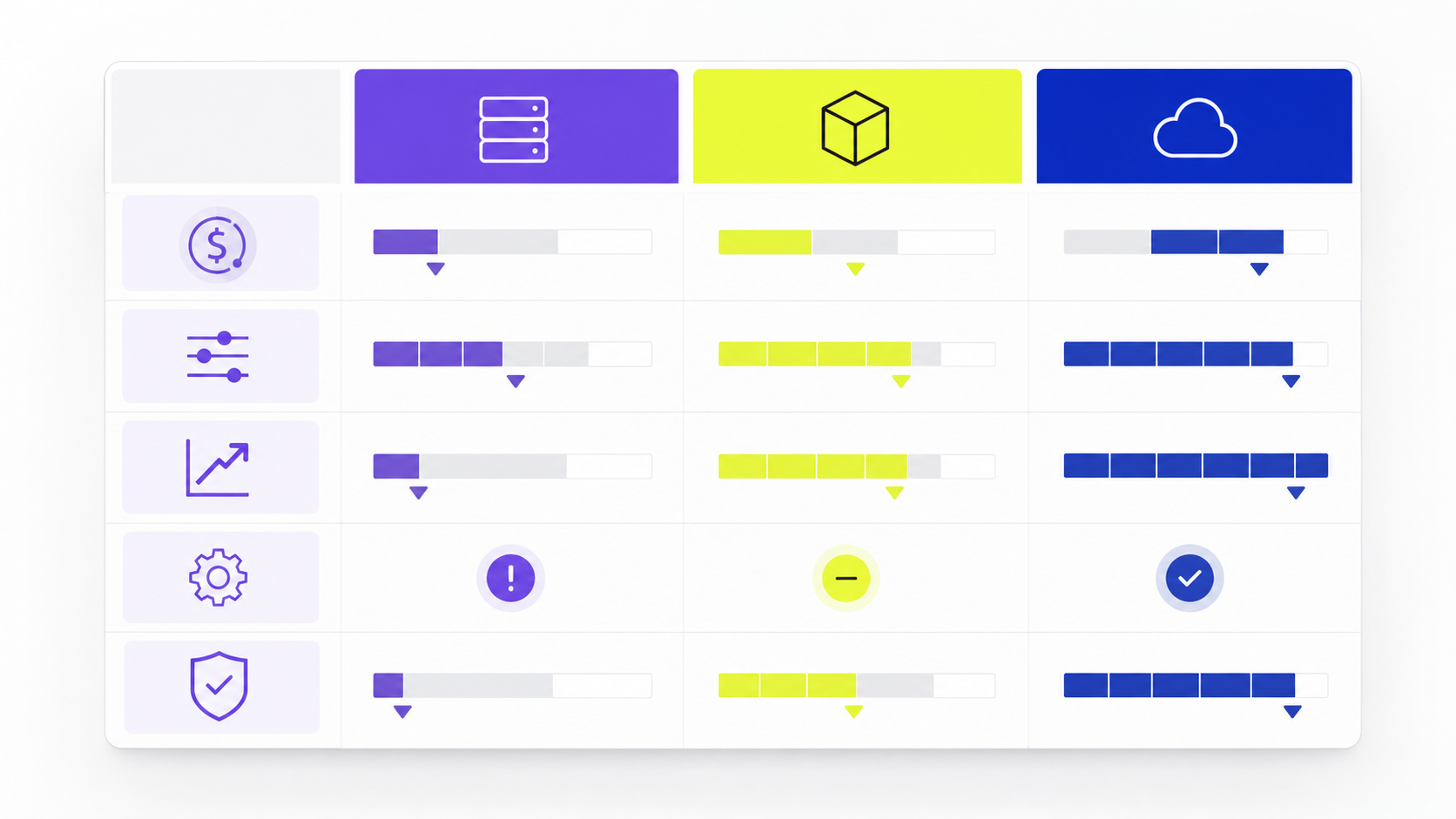
Shared hosting usually wins on visible monthly price. VPS often wins on price-to-control ratio. Cloud wins when downtime, scaling limits, or manual operations become more expensive than managed services.
But the invoice is incomplete. Add support time, migration risk, backup reliability, monitoring, security maintenance, and outage cost. A five-euro hosting plan that causes a failed launch can be more expensive than a managed cloud setup. A cloud architecture with unused resources can be more expensive than a well-maintained VPS.
The correct budget model is total cost of ownership. Include infrastructure, tooling, maintenance, support, and business risk.

Recommendation by use case
For a small company website, landing page, or early blog, start with reliable shared hosting and keep the stack simple.
For a content-heavy site, CRM integration, automation dashboard, or custom application, use VPS when you need runtime control and can manage operations properly.
For an e-commerce platform, SaaS product, AI application, high-traffic media site, or mission-critical workflow, use cloud hosting or a managed platform built on cloud primitives. The extra complexity is justified when resilience and scale directly protect revenue.
If your team is unsure, document the expected workload and run a small infrastructure audit before migrating. Nextis AI can help map hosting choices to performance, automation, and growth requirements through a practical technical review at nextis-ai.com.
Sources and Further Reading
- MadBeeTech: Shared vs VPS vs Cloud Hosting
- Hostinger: Shared Hosting vs VPS Hosting
- Contabo: Cloud VPS and Dedicated Servers
- AWS Lightsail
- Amazon EC2
FAQ
Is VPS always faster than shared hosting?
Not always. A well-optimized shared host can outperform a poorly configured VPS. VPS gives more predictable resources and control, but performance still depends on server configuration, caching, database tuning, and application quality.
Is cloud hosting better than VPS?
Cloud hosting is better when you need elasticity, managed services, high availability, or distributed architecture. A VPS can be better when the workload is simple, predictable, and cost-sensitive.
When should a small business leave shared hosting?
A small business should leave shared hosting when the website becomes revenue-critical, needs custom server configuration, suffers from recurring performance limits, or requires stronger isolation and deployment control.
What is the safest migration path?
The safest path is to measure first, back up everything, create a staging environment, migrate during low-traffic hours, monitor DNS and application errors, and keep a rollback plan ready.